
import pandas as pdrevenue_q1 = pd.DataFrame(
{
"month": ["Jan", "Feb", "Mar"],
"revenue": [175589, 189645, 163423],
}
)
revenue_q1revenue_q2 = pd.DataFrame(
{
"month": ["Apr", "May", "Jun"],
"revenue": [14567, 15863, 17999],
}
)
revenue_q2pd.concat([revenue_q1, revenue_q2])I had Copilot generate the DataFrames, so no idea if the numbers are real.
populations = pd.DataFrame(
    {
        "Country": ["China", "India", "Pakistan"],
        "Population": [1444216107, 1393409038, 220892331],
    }
)

populationsgdps = pd.DataFrame(
{
"Country": ["China", "India", "United States", "Indonesia", "Pakistan"],
"GDP": [14342903, 2875142, 21433226, 1058393, 263687],
}
)
gdpspd.merge(populations, gdps, on="Country")pd.merge(populations, gdps, on="Country", how="outer")Today’s goal: Which Community Districts have the most 311 requests? Why might that be?
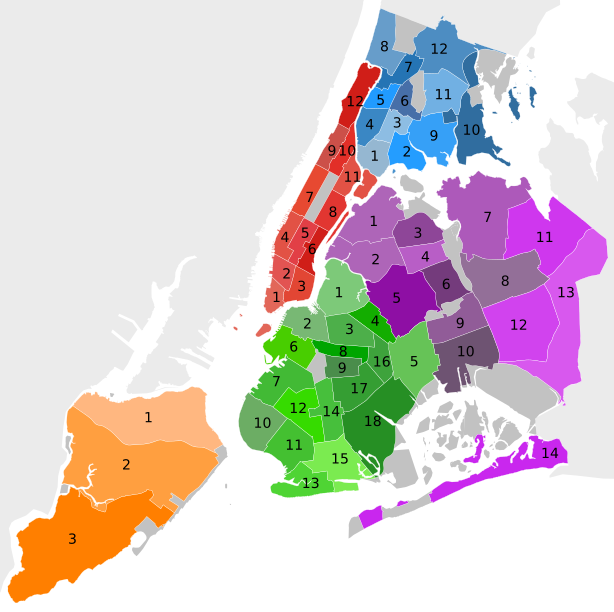
What’s a Community District?
59 local governance districts each run by an appointed Community Board
Community boards advise on land use and zoning, participate in the city budget process, and address service delivery in their district.
Community boards are each composed of up to 50 volunteer members appointed by the local borough president, half from nominations by the local City Council members.
Setup
# Display more rows and columns in the DataFrames
pd.options.display.max_columns = 100
pd.options.display.max_rows = 100
Read our cleaned 311 Service Requests dataset
url = "https://storage.googleapis.com/python-public-policy2/data/311_requests_2018-19_sample_clean.csv.zip"
requests = pd.read_csv(url)
/var/folders/kr/nx0m1j811kz5vy8c87ffchzr0000gn/T/ipykernel_12586/610958175.py:2: DtypeWarning: Columns (8,20,31,34) have mixed types. Specify dtype option on import or set low_memory=False.
requests = pd.read_csv(url)
View the contents of the community_board column in our 311 data
requests["Community Board"].unique()array(['15 BROOKLYN', '03 BROOKLYN', '14 QUEENS', '10 BRONX', '08 QUEENS',
'02 BRONX', '01 QUEENS', '11 QUEENS', '02 MANHATTAN',
'18 BROOKLYN', '12 QUEENS', '01 STATEN ISLAND', '12 BRONX',
'05 BROOKLYN', '01 BRONX', '09 QUEENS', '04 BROOKLYN',
'10 BROOKLYN', '02 STATEN ISLAND', '05 QUEENS', '04 MANHATTAN',
'11 BRONX', 'Unspecified BROOKLYN', '09 BRONX', '12 MANHATTAN',
'09 BROOKLYN', '14 BROOKLYN', '06 MANHATTAN', '10 MANHATTAN',
'Unspecified QUEENS', '01 MANHATTAN', '03 MANHATTAN', '05 BRONX',
'08 BROOKLYN', '02 QUEENS', '12 BROOKLYN', '01 BROOKLYN',
'16 BROOKLYN', '13 BROOKLYN', '06 QUEENS', '07 MANHATTAN',
'11 BROOKLYN', 'Unspecified BRONX', '08 MANHATTAN',
'03 STATEN ISLAND', '06 BROOKLYN', '03 BRONX', '05 MANHATTAN',
'07 QUEENS', '13 QUEENS', '17 BROOKLYN', '06 BRONX', '02 BROOKLYN',
'10 QUEENS', 'Unspecified MANHATTAN', '03 QUEENS', '04 BRONX',
'11 MANHATTAN', '08 BRONX', '07 BROOKLYN', '07 BRONX',
'0 Unspecified', '09 MANHATTAN', '04 QUEENS', '83 QUEENS',
'80 QUEENS', 'Unspecified STATEN ISLAND', '55 BROOKLYN',
'82 QUEENS', '64 MANHATTAN', '28 BRONX', '95 STATEN ISLAND',
'81 QUEENS', '27 BRONX', '26 BRONX', '56 BROOKLYN', '84 QUEENS'],
dtype=object)Get the count of 311 requests per Community District
cb_counts = requests.groupby("Community Board").size().reset_index(name="num_311_requests")
cb_counts = cb_counts.sort_values("num_311_requests", ascending=False)
cb_countsResearch Question: What may account for the variance in count of requests per community district?
Hypothesis: Population size may help explain the variance.
We can combine the counts per community district dataset with population data for each community district.
We’ll use pandas’ .merge(), comparable to:
In general, called “record linkage” or “entity resolution”.
Let’s load the population dataset and check out its contents
population = pd.read_csv("https://data.cityofnewyork.us/api/views/xi7c-iiu2/rows.csv")
population.head()We need a composite key
BORO CODE (a.k.a. BoroCode, borocd, and boro_cd) is a commonly-used a unique ID for community districts. Let’s create functions that create that unique ID in our datasets.
BoroCD is a 3 digit integer that captures the borough and district number. The borough is represented by the first digit. The district number is padded with zeros so it’s always two digits long.
Boroughs are recoded into the following numbers:
1: Manhattan
2: Bronx
3: Brooklyn
4: Queens
5: Staten Island
Ex:
Manhattan 12 --> 112
Brooklyn 6 --> 306
First, let’s create a borocd column in cb_counts DataFrame
cb_counts.head()apply() can be used for transforming data with a custom function. How does it work?
def my_function(row):
    # do stuff
    return some_value

new_values = dataframe.apply(my_function, axis=1)
While pandas generally operates on an entire column at once, apply() effectively loops through rows.
Let’s create a function called recode_borocd_counts that takes a row and converts the Community Board value into a borocd value.
def recode_borocd_counts(row):
    if "MANHATTAN" in row["Community Board"]:
        return "1" + row["Community Board"][0:2]
        # [0:2] provides the first 2 characters, i.e. characters at indexes 0 and 1.
        # you could also use [:2] without the zero.
    elif "BRONX" in row["Community Board"]:
        return "2" + row["Community Board"][0:2]
    elif "BROOKLYN" in row["Community Board"]:
        return "3" + row["Community Board"][0:2]
    elif "QUEENS" in row["Community Board"]:
        return "4" + row["Community Board"][0:2]
    elif "STATEN ISLAND" in row["Community Board"]:
        return "5" + row["Community Board"][0:2]
    else:
        return "Invalid BoroCD"
Let’s test out that function in isolation. We’ll grab one of the rows and pass it into the function.
sample_row = cb_counts.iloc[0]
sample_row
Community Board 12 MANHATTAN
num_311_requests 14110
Name: 50, dtype: objectrecode_borocd_counts(sample_row)'112'Now we use apply() to do that across all the rows.
cb_counts["boro_cd"] = cb_counts.apply(recode_borocd_counts, axis=1)apply()(the way we’re using it) takes a function and runs it against each row of a DataFrame, returning the results as a Seriesaxis=1specifies that you want to apply the function across the rows instead of columnscb_counts['borocd'] = …creates a new column in the DataFrame calledborocd
cb_countsUh oh, there are some unexpected Unspecified values in here - how can we get around them?
Let’s only recode records that don’t start with “U”.
def recode_borocd_counts(row):
    if "MANHATTAN" in row["Community Board"] and row["Community Board"][0] != "U":
        return "1" + row["Community Board"][0:2]
    elif "BRONX" in row["Community Board"] and row["Community Board"][0] != "U":
        return "2" + row["Community Board"][0:2]
    elif "BROOKLYN" in row["Community Board"] and row["Community Board"][0] != "U":
        return "3" + row["Community Board"][0:2]
    elif "QUEENS" in row["Community Board"] and row["Community Board"][0] != "U":
        return "4" + row["Community Board"][0:2]
    elif "STATEN ISLAND" in row["Community Board"] and row["Community Board"][0] != "U":
        return "5" + row["Community Board"][0:2]
    else:
        return "Invalid BoroCD"


cb_counts["boro_cd"] = cb_counts.apply(recode_borocd_counts, axis=1)
cb_countsWe can make this function easier to read by isolating the logic that applies to all the conditions. This is called “refactoring”.
def recode_borocd_counts(row):
    board = row["Community Board"]

    # doing a check and then returning from a function early is known as a "guard clause"
    if board.startswith("U"):
        return "Invalid BoroCD"

    num = board[0:2]

    if "MANHATTAN" in board:
        return "1" + num
    elif "BRONX" in board:
        return "2" + num
    elif "BROOKLYN" in board:
        return "3" + num
    elif "QUEENS" in board:
        return "4" + num
    elif "STATEN ISLAND" in board:
        return "5" + num
    else:
        return "Invalid BoroCD"
cb_counts["boro_cd"] = cb_counts.apply(recode_borocd_counts, axis=1)
cb_countsNext, let’s create the borocd column in the population dataset
population.head()population.info()<class 'pandas.core.frame.DataFrame'>
RangeIndex: 59 entries, 0 to 58
Data columns (total 8 columns):
# Column Non-Null Count Dtype
--- ------ -------------- -----
0 Borough 59 non-null object
1 CD Number 59 non-null int64
2 CD Name 59 non-null object
3 1970 Population 59 non-null int64
4 1980 Population 59 non-null int64
5 1990 Population 59 non-null int64
6 2000 Population 59 non-null int64
7 2010 Population 59 non-null int64
dtypes: int64(6), object(2)
memory usage: 3.8+ KB
Create a function recode_borocd_pop that combines and recodes the Borough and CD Number values to create a BoroCD unique ID.
def recode_borocd_pop(row):
    if row.Borough == "Manhattan":
        return str(100 + row["CD Number"])
    elif row.Borough == "Bronx":
        return str(200 + row["CD Number"])
    elif row.Borough == "Brooklyn":
        return str(300 + row["CD Number"])
    elif row.Borough == "Queens":
        return str(400 + row["CD Number"])
    elif row.Borough == "Staten Island":
        return str(500 + row["CD Number"])
    else:
        return "Invalid BoroCD"
This is different than recode_borocd_counts() because:
The
BoroughandCD Numberare seprate columns in thepopulationDataFrame, rather than combined in one like the 311 dataWe are working with the
CD Numberas an integer rather than a string
population["borocd"] = population.apply(recode_borocd_pop, axis=1)
populationJoin the population data onto the counts data after creating shared borocd unique ID
To join DataFrames together, we will use the pandas .merge() function.

merged_data = pd.merge(left=cb_counts, right=population, left_on="boro_cd", right_on="borocd")
merged_data# remove the redundant column
merged_data = merged_data.drop("borocd", axis="columns")
# save the data to a file
# merged_data.to_csv("data/community_district_311.csv", index=False)